💰 NOWOŚĆ: Ile jest warta Twoja Tesla? Podaj model, rok, km i stan baterii → cena z realnych ofert. ⚡ Sprawdź TUTAJ 👆

Aktualizacja oprogramowania Tesla Najnowsza Zarejestrowana przed instalacją

Tesla 2026.39.6

Co nowego w aktualizacji 2026.39.6: FSD (Supervised).

Wersja
2026.39.6
Pierwszy raz
Zarejestrowana w
Model 3
Tę wersję zarejestrowaliśmy w aucie, które miało ją już pobraną i gotową do instalacji — przed szerszym udostępnieniem.

Co nowego w 2026.39.6

Tesla wysyła informacje w języku ustawionym w samochodzie. Tę wersję mamy na razie tylko w innym języku.

FSD (Supervised)

FSD (Supervised)

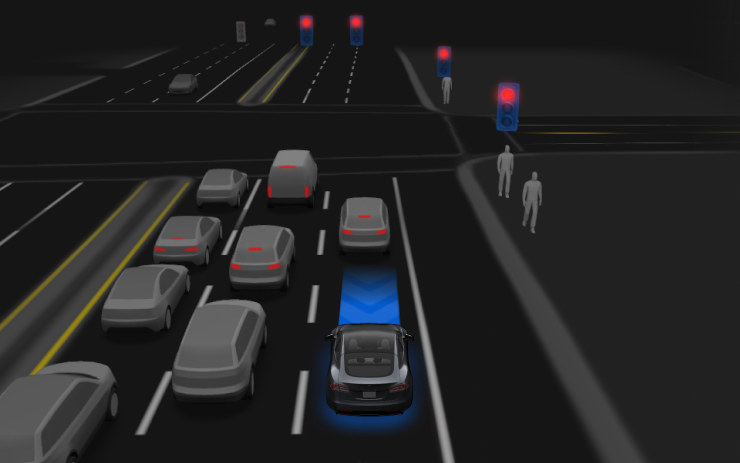
Under your supervision, FSD (Supervised) can drive your Tesla almost anywhere. It will start from a parked position, make lane changes, select forks to follow your navigation route, navigate around other vehicles and objects, make left and right turns and stop at your destination. You and anyone you authorize must use additional caution and remain attentive. It does not make your vehicle autonomous. Do not become complacent.

FSD (Supervised) is enabled on your vehicle. To use the feature, first watch the tutorial and take the quiz, available in the new Self-Driving App or in Control > Self-Driving. Then press the Start FSD (Supervised) button on the UI, or press the right scroll wheel button once. You can disable FSD (Supervised) in Self-Driving Settings.

Tekst pochodzi bezpośrednio z samochodu przez oficjalne Tesla Fleet API i jest pokazany bez zmian. Obrazy i teksty są własnością Tesla, Inc.

Jak zainstalować 2026.39.6

Otwórz na ekranie Sterowanie → Oprogramowanie. Jeśli wersja 2026.39.6 jest dostępna dla Twojego auta, zobaczysz ją tam. Auto musi być zaparkowane, instalacja trwa zwykle 20–40 minut. Jeśli jej jeszcze nie widzisz, Tesla prawdopodobnie dopiero ją rozsyła.

Szukasz Tesli z najnowszym oprogramowaniem?

Na TesList przy ogłoszeniach widzisz prawdziwe dane z auta — stan baterii, wyposażenie i wersję oprogramowania.