FSD (Supervised) Naming Update
This change only updates the name of certain features and text in your vehicle, and does not change the way your features behave.
Neu im Update 2026.39.100: FSD (Supervised) Naming Update, Tesla Assisted Driving.
Tesla sendet die Hinweise in der im Fahrzeug eingestellten Sprache. Diese Version liegt uns bisher nur in einer anderen Sprache vor.
This change only updates the name of certain features and text in your vehicle, and does not change the way your features behave.
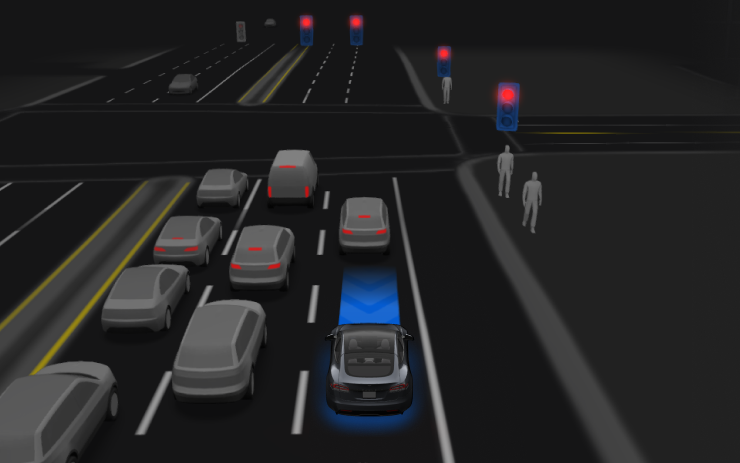
Under your supervision, Tesla Assisted Driving can drive your Tesla almost anywhere. It will start from a parked position, make lane changes, select forks to follow your navigation route, navigate around other vehicles and objects, make left and right turns and stop at your destination. You and anyone you authorize must use additional caution and remain attentive. It does not make your vehicle autonomous. Do not become complacent.
Tesla Assisted Driving is enabled on your vehicle. To use the feature, first watch the tutorial and take the quiz, available in the Assisted Driving App or in Control > Assisted Driving. Then press the Start Assisted Driving button on the UI, or press the right scroll wheel button once. You can disable Tesla Assisted Driving in Assisted Driving Settings.
Der Text stammt direkt aus dem Fahrzeug über die offizielle Tesla Fleet API und wird unverändert angezeigt. Bilder und Texte sind Eigentum von Tesla, Inc.
Öffnen Sie auf dem Display Fahrzeug → Software. Ist 2026.39.100 für Ihr Fahrzeug freigegeben, sehen Sie es dort. Das Fahrzeug muss parken; die Installation dauert meist 20 bis 40 Minuten. Sehen Sie es noch nicht, verteilt Tesla es vermutlich noch.
Auf TesList sehen Sie bei Inseraten echte Fahrzeugdaten — Batteriezustand, Ausstattung und Softwareversion.